Showing posts with label Tablet Review. Show all posts

Huawei MediaPad M3 8" Kirin 950 Tablet

A wolf in a smooth metal casing? It's pretty to look at, beautiful to hold, streamlined, and has a ginormous specification. What more could anyone ask for. Everything about the M3 can be summed up in one word. Smooth. The finish is spectacular and the performance is, well, extremely smooth. It's definitely up there with the iPad's and Samsung's of the world. Yes, that includes price wise too. 
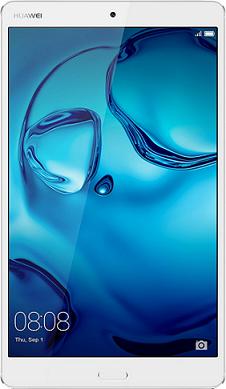
Huawei_MediaPad_M3_8-Inch_Kirin_950_Tablet_Review

Don't let that deter you. This is worth the price. In fact, if you are dead-set on buying an eight inch Tablet, I doubt you will find a better one right now until than the Huawei MediaPad M3. 

The new Huawei M3 uses the high performance Hisilicon Octa Core Kirin 950 Processor, consisting of 4 x A72 Cores @2.3 GHz plus 4 x A53 Cores @1.8 GHz. This is the same Processor that's installed in some of their cutting edge Smartphones, including the Mate 8. The Kirin 950 Processor is super quick and extremely energy-efficient. 

Combined with the Mali-T880 MP4 GPU (Graphics Processor) and the 4GB RAM that comes as standard in this model, the M3 is capable of running even the most heavy resource-sapping programs, games and Apps while still remaining stable and lag-free.

Huawei MediaPad M3 (BTV-DL09) Quick Specification


  • Hisilicon Octa Core Kirin 950 Processor
  • Android 6.0 Marshmallow Operating System + Emotion UI 4.1
  • 8.4" IPS screen (2560 x 1600) with ClariVU for that extra sparkle
  • Dual cameras, both of which are 8 Megapixels a piece
  • 4GB RAM (LPDDR4)
  • 32GB Storage Space
  • 4G / LTE Compatible
  • Harman Kardon Speakers
  • Micro USB Port
  • Micro SD Card Slot (Max 128GB)
  • Fingerprint I.D Feature
  • Internal Microphone
  • Nano Sized SIM Card Slot
  • 3.5mm Headphone Jack
  • Bluetooth
  • WiFi


Having such a high specification makes the M3 a pleasure to use for browsing the Internet, social media, watching video clips and catch up TV. It can do all those tasks and more without really using much of its resources. Incredible performance. Great for multi-tasking. You may have noticed in the spec list that there was no HDMI port. There isn't one. However, all you need to do is buy the appropriate USB to HDMI cable (cheap), or you can connect the two devices via WiFi if the other device has this feature.
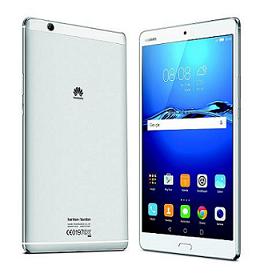
 

Huawei-8-4GB-RAM-4G-Tablet2


If you're an avid Kindle user, or spend a long time on the Tablet and suffer from eye strain as a result, you may find the clever, softer on the eyes smart display feature (Ambient Light Sensor) a real joy. It basically manages to keep the brightness feeling mellow on the eyes. Automatically fine tuning the displays brightness level to suit the environment you're in so that it's a perfect match. 

Not too dark and not too bright. This technology is nothing new but it works especially well, or just appears to look better than usual in this device due to the super vivid ClariVu 3 enhanced IPS display.

How much coverage do you need? The Huawei M3 (53017209) has an impressive array of GPS capabilities. It has normal GPS and Glonass (Russian GPS). These two can be used in conjunction for more location accuracy. 

It also has A-GPS (Assisted GPS). This works alongside GPS as a backup, helping to take advantage of mobile phone towers when Satellite signals are lacking. Having the ability to use both gives a helping hand when the device is being used in built up areas where the Satellite's ability to make a strong connection is limited.

If that isn't enough tracking for you, the M3 even has BeiDou. The Chinese Navigation Satellite System (GNSS).

In every regard, the MediaPad M3 seems very stable. But only time will tell to see if it stays that way after months of use. But wow, what a device. Weighing in at a little over 300 grams, it's also light in weight, less than a ⅓ of an inch thick and has an impressive 5100mAh battery. Colours available: Silver or Gold. Take a look at the latest model.

Linx 12V64 12 Inch Tablet Review

The Linx range of tablets offer a good overall computing experience and an affordable price tag. Some have better reviews than others. The Linx 12V64 has one of the largest high-definition screens to date. It appears that Linx are trying hard to keep up with current demand, where some people now want a bigger tablet in order to work more easily and efficiently. And to be able to have a better experience when doing things like watching movies and playing games. 


Linx-12V64_12X64_VS


Due to the larger screen (@1920 x 1200), the Linx 12V64 does offer the best of both worlds. In terms of being able to perform work related tasks with ease, other than screen size, it is the external keyboard which plays a vital role in making this possible.

But, apart from the twelve-inch screen (12.2" to be exact), what does the 12V64 have that other Linx models, such as the 1010, 1010B (keyboard bundle), 1020 and 10V series don't have. 

Well, firstly, it is one of the very latest models, so that alone gives it a revamp in terms of being the most up to date and hopefully having any minor issues present in earlier models resolved. It also has the more impressive spec sheet. But as far as the core features go, they are all fairly similar. Especially the 10V32 and 10V64.

They all operate on Windows 10, but design wise, the 12V64 does seem to be a bit more sleek and refined. It is thicker than previous models and the keyboard is much slimmer. The build quality is right on the money. 

Screen clarity, colouring and sharpness are definitely above average for this price point. Weighing in at not much under 1KG, It's not really a super lightweight machine. But taking the increased dimensions into consideration, that weight is well-distributed and adds to the quality and substantial feel of the device.

As the name tells us, this model does have a better specification than the others. The 12 stands for the screen size and the 64 represents the amount of internal storage space (eMMC) and the Windows operating system version (this one is 64 bit) that the device comes with. 

There is also a "32" model which has 32GB storage space and runs the 32 bit version of Windows 10 (Home). This will read as 12V32. So be aware of that if you want the more advanced, but also more expensive 64. 

Also worth watching out for, there are two different RAM choices. One comes with 2GB RAM and the other has 4GB RAM. Obviously, more RAM will help ensure better multi-tasking ability and smoothness, but even the 2GB model is a very capable machine.

It performs well, and the keyboard that is supplied with each model is very thin and really nice to use. Although it would have been nice if the keys were protruding more. But that's more of a personal preference rather than a design fault. 

The trackpad is very responsive and the back stand makes easy work of being able to angle the device to resemble a laptop. Although, don't think you'll be able to sit back in a chair with the Linx on your lap (tablet + keyboard attached) and expect to use it like a laptop. See the pictures, the stand really needs a flat surface to be effective.


Overall, this is a good, very portable, two-in-one device that can mix it up rather well. The Quad Core Intel Atom X5 (Z8300) Processor (1.4GHz) is a competent all-rounder It's great for work related tasks, like using Microsoft Excel, Word and Access, but equally just as good when it comes to all things entertainment. Apps, catch up TV, Internet browsing and Gaming. 
 
And when you consider the price when compared to the other, more lower specification Linx tablets, the extra money you pay does seem worth it.

Someone said they picked a 12V64 up from Sainsbury's (UK) for £200, which is an excellent deal. Don't build you're hopes up. Although I am not 100% certain, I don't think this special offer is still running. 
 
However, if you do happen to see the offer still live at your local Sainsbury's, snap one up fast. The 12V64 is considerably more expensive everywhere else online and on the high-street. For what few reviews there are for this model so far on Amazon, they are all positive. So that's a good early sign.

The micro SD slot can hold an additional 200GB of storage. This is great, but its nothing new. Some tablets costing less than half the price of the 12V are already capable of this. Such as the Neocore E1, which can hold upto 512GB.
 
Battery duration has always been a concern for Linx tablets, but so far reports claim that the one built into this model does retain its power to a respectable standard. The average duration, per full charge, is penciled in at around seven hours. Of course, this is widely dependant on the user and how demanding they are.

Other than all the usual features that come on tablets these days, It also benefits from having a full-sized USB port (also micro USB ports), and a Micro HDMI. Twin speakers and dual cameras are present. Of course, it has WiFi, Bluetooth and a 3.5mm headphone jack. 
 
Will it replace your laptop. Maybe for some people, yes. Compared to a full-sized laptop it is lightweight. Some are comparing this model to the Surface Pro 4. It is comparable in many ways, but there are quite a few reasons why the Pro 4 costs a lot more to buy.

Summed up in one sentence, it is finished to an extremely high standard and a level above when it comes to performance. However, for the money (far less than the Pro 4) the 12V is a capable and very versatile device, and I can clearly see why some are making the comparison. A good 2 in 1 for the price. Another twelve-inch 2 in 1 possibly on the way soon is from the brand RCA. So keep a look out for that also.

Buy An Apple iPad 4 Mini 64GB Tablet

Eight Inch Tablets are widely considered as the perfect size for most uses. Small and light enough to still be portable, but big enough to make pass times like streaming and watching movies an enjoyable experience. At 7.9", the Apple iPad 4 Mini falls just under the eight inch size range. However, for what it gives away in size, which is minute anyway, it more than makes up for in other areas. 

Apple_iPad_4_Mini_White
 

The screen alone beats almost everything else in its category and beyond. If you're looking for something at the pinnacle of small screen technology, look no further. The deepness and most colour abundant champion of small screens is the Apple iPad Mini 4. The quality can only be described as amazing, and the colour gamut range really is top shelf.


Excellent Display


The Apple iPad Mini 3 has an excellent display, and although they both share the same resolution PPI, the Mini 4 beats it in colour gamut by over 25%. Such an excellent colour range and razor-sharp clarity from the 2048 x 1536 laminated IPS retina screen. The operating system installed on this model is iOS 9.2.


iPads are superior to most


As with all Apple iPad's, the build quality is superb. It's light in weight (around 300 Grams) and slim beyond belief. In the hand, top quality brushed aluminium is a far cry from anything else that isn't finished using the same material. As crazy as this might sound to some, it's such a beautiful device to handle that it makes you want to treat it delicately with care and respect.

Even more worthy of respect is the performance. In a world that see's more Cores as being better (Which a lot of the time isn't the case), would you believe that the iPad Mini 4th Generation still uses a Two Core Processor? Well, it does. It uses a Dual Core A8 (64‑bit) Processor @ 1.5 GHz. 

Which goes to prove, more Cores doesn't always mean better performance. Adding more horsepower to the overall specification is the Quad Core Graphics Processor (PowerVR GX6450) and 2GB of RAM. The battery life from the advanced Lithium Polymer 5124 mAh battery is also impressive.


Apple_iPad_4_Mini_Silver_Black_UK_SpaceGray
 

This model (64GB) is WiFi only (No 3G or 4G). However, although not a new technology, the Mini 4th Generation supports the faster WiFi IEEE 802.11ac, as well as 802.11 a/b/g/n. This means you can use either 2.4GHz WiFI, or the faster and less crowded 5GHz frequency band. 

Please be aware: If you haven't already, you will have to upgrade to a faster router via your Internet Service Provider if you want to take advantage of this feature. It's not automatically activated once you use your Mini 4 on your WiFi network.

However, it's not really needed if you are happy with your Internet connection. The sound quality of the speakers is superior to quite a lot of devices of similar size. Also built-in is a front facing 1.2mp camera (720p) and an 8mp iSight rear camera, which is capable of so much. Including slow motion, burst mode, Panorama, and quality as high as 1080p.


More features and considerations


The inclusion of a 3.5mm headphone jack, Bluetooth 4.2 and Touch ID do soften the blow slightly, but the lack of easy, convenient connectivity can't be ignored. There is no USB Port, no HDMI Port and no Micro SD card slot. Of course, they are ways round these limitations but some require additional purchases, and that is a bit disappointing really. Limitations aside, this is one of the best eight inch tablets out there. Colours available: Gold, Silver and Space Grey.

Ready to buy the Apple iPad 4 Mini? Make sure to get a case / cover with your purchase. You'll be glad you did. If you want to save some money but still get the full Apple experience, the iPad Air 2 is well worth considering. Budget not an issue? Apple iPad Pro is the way to go!

Popular Posts